SellUp can automatically show AI-powered product recommendations on any product page that doesn't have an On Page Offer set up.
Recommendations are based on previous customer activity in your store, so you get relevant upsells without configuring an offer for every product.
How to enable it
- In your Shopify admin, open the SellUp app.
- Go to On Page Offers.
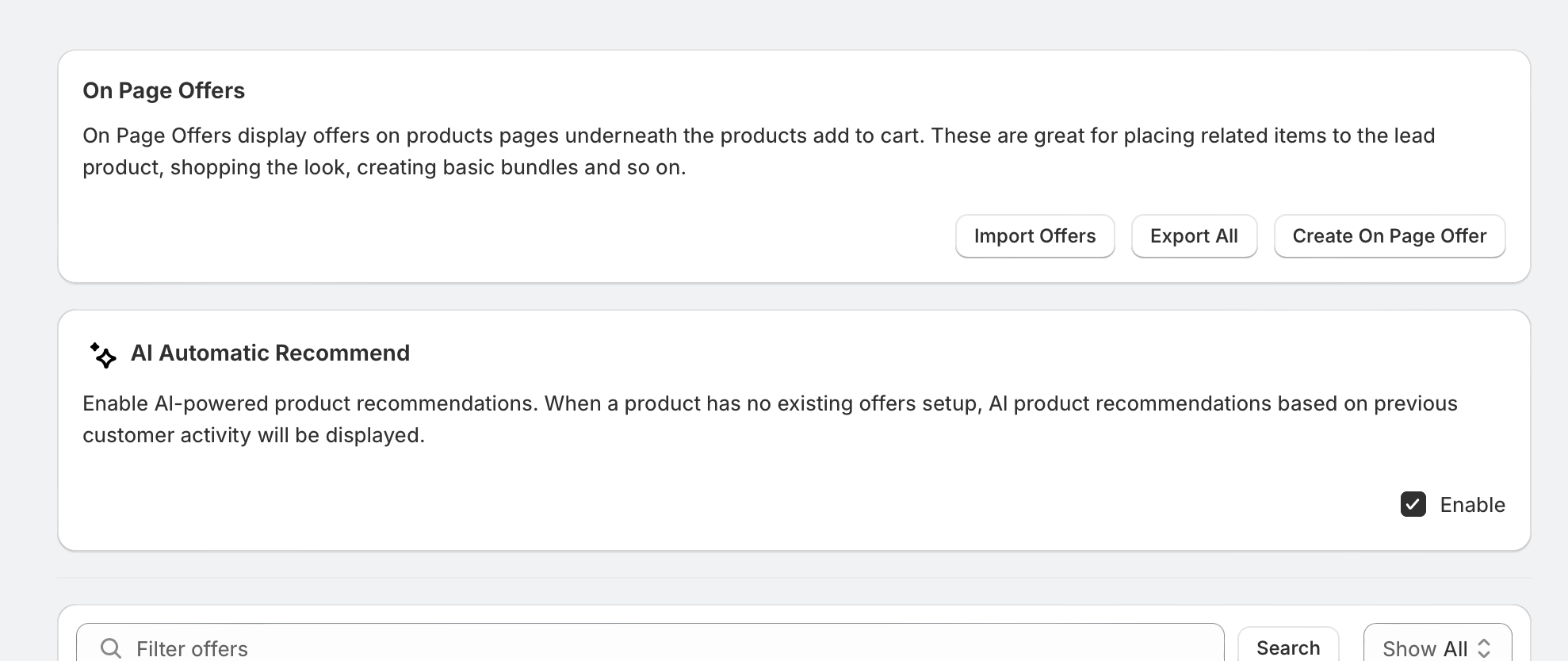
- Find the AI Automatic Recommend section, just below the On Page Offers header.
- Tick the Enable checkbox.
That's it. The setting saves automatically and recommendations will begin appearing on eligible product pages.
Things to know
- AI recommendations only display on products with no existing On Page Offer. Any offers you've created manually will always take priority.
- Recommendations improve over time as more customer activity is collected. New stores or stores with low traffic may see fewer or more general suggestions at first.
- To turn recommendations off, simply untick Enable. Your manual On Page Offers are unaffected.
Was this article helpful?
That’s Great!
Thank you for your feedback
Sorry! We couldn't be helpful
Thank you for your feedback
Feedback sent
We appreciate your effort and will try to fix the article