Every chat your AI has with customers — from both the storefront widget and your standalone chat page — is saved automatically. You can search and review them anytime under Dashboard › Conversations.
Viewing conversations
- Open Conversations from the left sidebar.
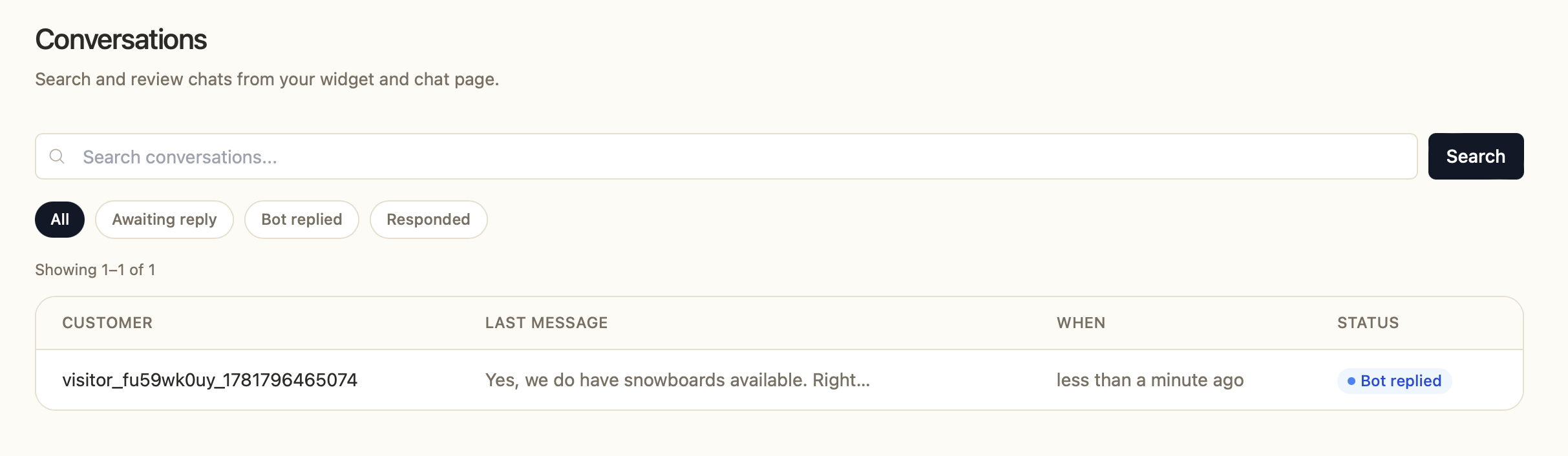
- You'll see a list showing each customer, their last message, when it happened, and the status.
- Click any row to open the full transcript.
Reading a transcript
Inside a conversation you'll see the complete back-and-forth between the visitor and the Assistant, with timestamps for each message and when the chat started. If the visitor shared their details, you'll also see their name and email linked to their contact record. Anonymous visitors are shown with a visitor ID.
Filtering and searching
- Search — use the search bar to find conversations by keyword.
- Status filters— quickly narrow the list with the filter pills:
- Awaiting reply — the customer sent the last message and is waiting on a response.
- Bot replied — the AI sent the last message.
- Responded — a team member sent the last message.
Why review your history?
- Spot questions the AI couldn't answer well, then add knowledge or rules to fix them.
- Find common requests worth turning into Engage prompts or knowledge base articles.
- Catch conversations that need a human follow-up.
Was this article helpful?
That’s Great!
Thank you for your feedback
Sorry! We couldn't be helpful
Thank you for your feedback
Feedback sent
We appreciate your effort and will try to fix the article